# 10 Gbit PF_RING DNA on Virtual Machines (VMware and KVM) | ntop
> As you know, PF_RING DNA allows you to manipulate packets at 10 Gbit wire speed (any packet size) on low-end Linux servers. As virtualization is becoming perv
[Blog](https://www.ntop.org/blog/)[PF\_RING](https://www.ntop.org/category/pf_ring/)[vPF\_RING](https://www.ntop.org/category/vpf_ring/)
# 10 Gbit PF\_RING DNA on Virtual Machines (VMware and KVM)
June 30, 20112 min read
As you know, [PF\_RING DNA](https://www.ntop.org/products/packet-capture/pf_ring/) allows you to manipulate packets at [10 Gbit wire speed](https://www.ntop.org/how-to-sendreceive-26mpps-using-pf_ring-on-commodity-hardware/) (any packet size) on low-end Linux servers. As virtualization is becoming pervasive in data-centers, you might wonder whether you can benefit of DNA on virtualized environments. The answer is positive. This post explains you how to use DNA on both VMware and KVM, Linux-native virtualization system. XEN users can also exploit DNA configuring using similar system configurations.
## VMware Configuration
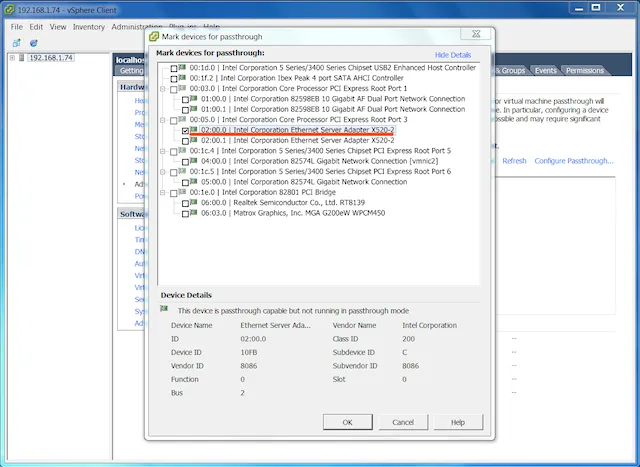
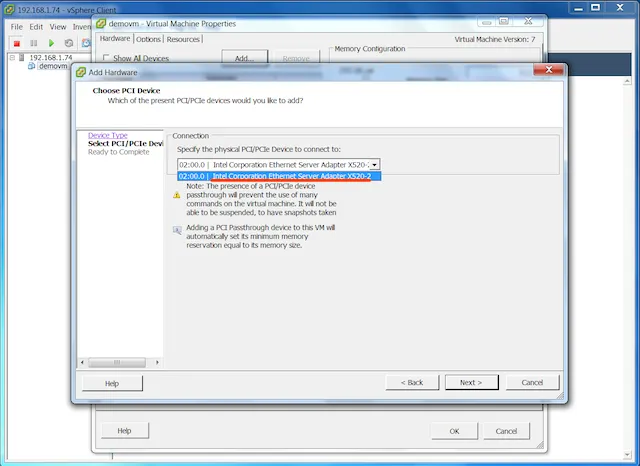
In order to use DNA, you must configure the 10G card in passthrough-mode as depicted below.
Once your card has been configured, it will pop-up from your VM. At this point you need to install the DNA driver that is part of the PF\_RING distribution.
## KVM Configuration
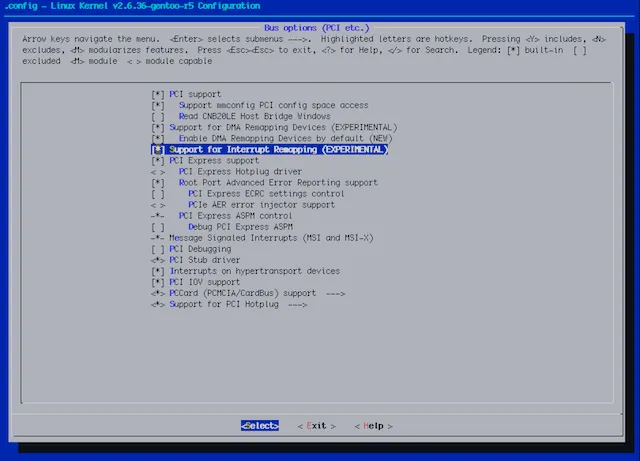
Under KVM you need to make sure you have enabled a few options
Modify the kernel config: $ make menuconfig Bus options (PCI etc.) \[\*\] Support for DMA Remapping Devices \[\*\] Enable DMA Remapping Devices \[\*\] Support for Interrupt Remapping <\*> PCI Stub driver $ make $ make modules\_install $ make install Pass “intel\_iommu=on” as kernel parameter. For instance, if you are using grub, edit your /boot/grub/menu.lst this way: title Linux 2.6.36 root (hd0,0) kernel /boot/kernel-2.6.36 root=/dev/sda3 intel\_iommu=on Unbind the device you want to assign to the VM from the host kernel driver $ lspci -n .. 02:00.0 0200: 8086:10fb (rev 01) .. $ echo “8086 10fb” > /sys/bus/pci/drivers/pci-stub/new\_id $ echo 0000:02:00.0 > /sys/bus/pci/devices/0000:02:00.0/driver/unbind $ echo 0000:02:00.0 > /sys/bus/pci/drivers/pci-stub/bind Load KVM and start the VM $ modprobe kvm $ modprobe kvm-intel $ /usr/local/kvm/bin/qemu-system-x86\_64 -m 512 -boot c -drive file=virtual\_machine.img,if=virtio,boot=on -device pci-assign,host=02:00.0
## DNA Performance on Virtual Machines
In a [previous post](https://www.ntop.org/how-to-sendreceive-26mpps-using-pf_ring-on-commodity-hardware/), we have tested the DNA performance on bare hardware. Now we’re testing the DNA performance on VMs using the same server used in the previous experiment using a Silicom [PE10G2SPi-SR](https://web.archive.org/web/20081226023753/http://www.silicom-usa.com:80/default.asp?contentID=774) 10G card. This allows you to feel the difference in speed. All tests have been performed running a single VM to which we have allocated only one core (single virtual CPU) out of the 8 available on the bare hardware. Both 10G ports have been mapped to a single VM (i.e. the VM is connected to two physical 10G ports), and a fibre is connecting the ports back-to-back.
| Test (64 byte packets) | KVM | VMware ESXi 4.1 |
| --- | --- | --- |
| pfsend/pfcount alone | | |
| (no both simultaneously) | 13’906’747.73 pps/9.35 Gbps | 13’689’510.41 pps/9.20 Gbps |
| pfsend and pfcount | | |
| (simultaneously on the same VM) | pfsend: 6’688’049.95 pps/4.49 Gbps | |
| pfcount: 5’693’580.60 pps/2’732.91 Mbit/sec | pfsend: 6’295’136.14 pps/4.23 Gbps | |
| pfcount: 5’614’627.52 pps/2’695.02 Mbit/sec | | |
## Final Remarks
On bare hardware you can reach wire rate (14.8 Mpps), whereas on a VM we stop at 13.9 Mpps. This means that using VMs we can reach 94% of the nominal speed using minimal size packets. Considering that our physical box has 8 cores, and we allocated only one core per VM, you can guess what happens when the remaining 7 cores are used…
## Keep reading
centoJan 25, 2026
### [nProbe Cento at Scale: Flow Offload Acceleration on Napatech](https://www.ntop.org/nprobe-cento-at-scale-flow-offload-acceleration-on-napatech/)
High-speed networks continue to push the limits of software-based monitoring and security applications. As link speeds grow and traffic patterns become more complex, efficiently analyzing packets while maintaining per-flow state, for updating…
AnnounceApr 28, 2025
### [Released PF\_RING 9.0.0: Fully Fledged Hardware Flow Tracking](https://www.ntop.org/released-pf_ring-9-0-0-fully-fledged-hardware-flow-tracking/)
This is to announce a new PF\_RING release 9.0.0! This release brings significant improvements for a deeper flow tracking integrations, making PF\_RING even more powerful for building high-performance flow processing networking applications…
PF\_RINGAug 6, 2024
### [Released PF\_RING 8.8.0: Flow Table Offload and nVidia BlueField Support](https://www.ntop.org/released-pf_ring-8-8-flow-table-offload-and-nvidia-bluefield-support/)
This is to announce a new PF\_RING release 8.8.0! This release adds generic support for flow table offload, which is currently supported on Napatech adapters with Flow Manager enabled. This new technology…
## Try it on your own network
Download the free Community edition and see your first flows in five minutes.
[Download ntopng free](https://www.ntop.org/support/documentation/software-installation/)[Talk to an engineer](https://www.ntop.org/support/need-help/contacts/)
Source: https://www.ntop.org/10-gbit-pf_ring-dna-on-virtual-machines-vmware-and-kvm/