Action Audit Log
nAnalyst maintains a comprehensive audit log of every action taken — by users through the chat interface and by the AI agent autonomously. This provides SOC2-style accountability for all AI-assisted operations.
What is logged
Every time nAnalyst takes an action that modifies ntopng state, an audit record is created. Logged actions include:
Adding an active monitoring script
Creating or modifying a network policy
Registering a new alert rule
Silencing or creating an alert exclusion (host, domain, certificate)
Any other tool call that writes to the ntopng configuration or database
Each audit record captures:
Action — what was done (e.g.,
add_active_monitoring_script)Actor — the ntopng user who initiated the session
Initiator type — whether the action was requested by the user or suggested and executed autonomously by the agent
Tool call content — the exact parameters passed to the tool
Timestamp — when the action occurred
Session ID — link back to the full conversation that produced this action
Viewing the audit log
The audit log is accessible from the nAnalyst observability panel. It can be filtered by:
User
Action type
Time range
Initiator (user-requested vs. agent-autonomous)
Each row is expandable to show the full tool call payload.
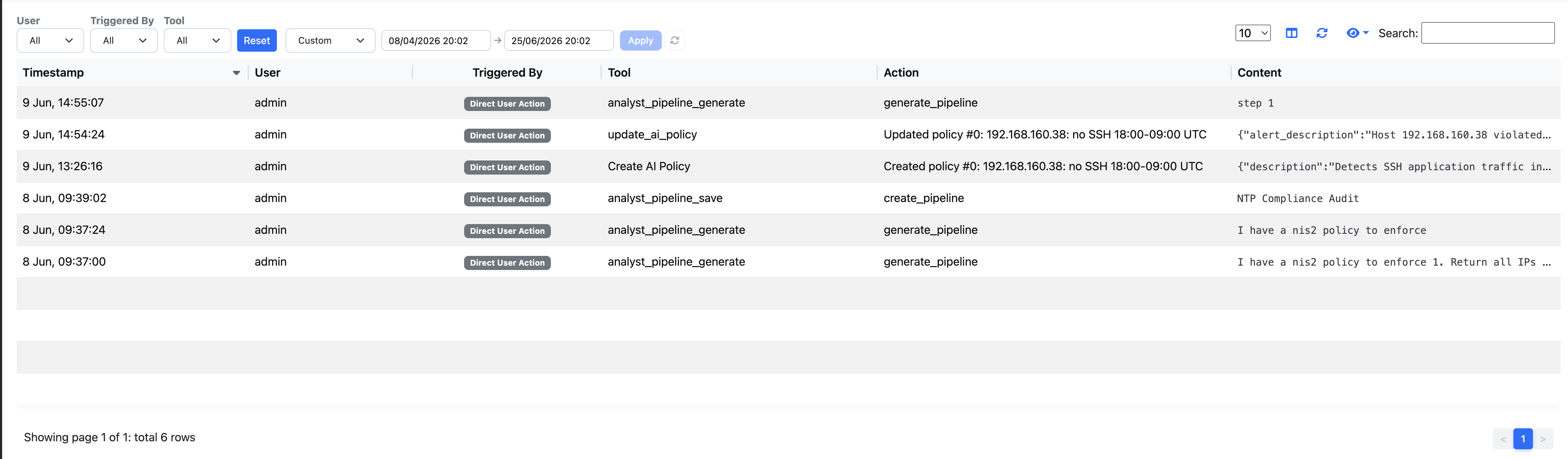
nAnalyst Audit Log
Blame and attribution
The audit log answers two accountability questions:
Who did this? — every action is attributed to an authenticated ntopng user, even when the action was performed autonomously by the agent following the user’s instruction.
Why did this happen? — the session ID links the action back to the full conversation, including the original user question that led the agent to take the action.
This makes nAnalyst audit-ready for environments that require change accountability, such as SOC operations, compliance audits, and post-incident reviews.
Note
The audit log is append-only. Actions recorded in it cannot be modified or deleted through the nAnalyst UI. Administrative database access would be required to alter audit records.
Compliance use cases
SOC2 evidence — demonstrate that all automated network changes have a traceable human initiator
Incident post-mortems — reconstruct the sequence of AI-assisted actions during an incident
Change management — review what configurations nAnalyst modified during a given time window
Insider threat monitoring — detect unusual patterns in AI tool usage by specific users