ntopng Logo

User's Guide

  • What is ntopng
  • Available Versions & Licensing
  • Installation
  • How to Start ntopng
  • Command Line Options
  • User Interface Guide
    • Network Interface
      • Dashboard
        • Traffic Dashboard
        • Traffic Reports
      • Monitoring
        • Network Discovery
        • Vulnerability Scan
      • Alerts
        • Flow Alerts Analyser
      • Flows
        • Flows
        • Historical
        • Server Ports
      • Hosts
        • Hosts
      • Maps
        • Analysis
        • Geo Map
        • Hosts
      • Interface
        • Details
        • Networks
        • Host Pools
        • Autonomous Systems
        • Countries
        • Operating Systems
    • System Interface
    • Alerts
    • Monitoring
    • Policies
    • Settings
    • Developer
    • Help
  • User Authentication
  • Using ntopng with ntop Tools
  • Flow Collection
  • Industrial Monitoring
  • Quality of Experience (QoE)
  • Operating ntopng on large networks
  • Flows Dump (ClickHouse)
  • Advanced Features
  • Third-Party Integrations
  • Performance and Hardware Sizing
  • FAQ

Developer's Guide

  • Developers
  • API Documentation

Other Products

  • nProbe
  • nProbe Cento
  • n2disk
  • nDPI
  • PF_RING
  • nEdge
  • nScrub
  • nBox
  • nTap
  • License Manager
ntopng
  • User Interface Guide
  • Network Interface
  • View page source

Network Interface

This Web Interface is used to monitor the status of a Network Interface; there can be different types of network interfaces, see this section for more info.
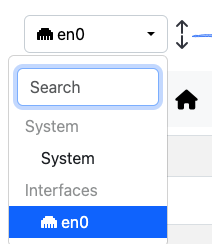
System Interface Dropdown

System Interface Dropdown

By changing interface and jumping to the Network Interface some options are going to be available.

Dashboard

  • Traffic Dashboard
  • Traffic Reports

Monitoring

  • Network Discovery
  • Vulnerability Scan
    • Vulnerability Scan Page
    • Vulnerability Scan Last Report Page
    • Alerts
    • Charts
    • Open Ports
    • Scan Reports

Alerts

  • Flow Alerts Analyser

Flows

  • Flows
    • Live
    • Flow Analysis
  • Historical
    • Enabling Flow Dump
    • Custom Queries
    • Historical Flows Explorer Analysis
    • Exporting Flows
    • Data Retention
    • Hourly Historical Flows
    • Aggregation Preferences
    • Replay Historical Flows
    • Historical Flows Archive for Compliance
    • Benefits
    • Enabling Flow Export
    • Default Export Location
    • Custom Export Directory
    • Importing Archived Flow Data
    • Viewing Imported Data in ntopng
    • Important Notes
  • Server Ports

Hosts

  • Hosts
    • Hosts

Maps

  • Analysis
    • Service Map
    • Periodicity Map
    • Asset Map
  • Geo Map
  • Hosts

Interface

  • Details
    • Packets
    • Applications
    • ICMP
    • ARP
    • Statistics
    • Traffic Profiles (Professional Version)
    • Settings
    • DHCP Range
    • Mirrored Traffic
  • Networks
  • Host Pools
    • Traffic Policies
  • Autonomous Systems
    • Timeseries
    • Ingress/Egress Stats
    • Hosts/Flows
  • Countries
  • Operating Systems
Previous Next

© Copyright 2026, ntop.

Built with Sphinx using a theme provided by Read the Docs.