
High-speed networks continue to push the limits of software-based monitoring and security applications. As link speeds grow and traffic patterns become more complex, efficiently analyzing packets while maintaining per-flow state, for updating stats and running Deep Packet Inspection, is increasingly challenging. By leveraging on our long term experience with high-speed packet processing, modern architectures, and state of the art data structures, during the past years we developed nProbe Cento, a high-performance NetFlow probe able to keep up with 100+ Gbit/s on adequate servers. However, this requires quite some resources (mainly CPU cores and memory bandwidth), which becomes a limit when trying to build boxes able to scale beyond 100 Gbit or when additional software should run on the same machine.
Scaling Up Beyond Packet Capture
Napatech provides advanced FPGA-based SmartNICs designed to offload and accelerate specific networking workloads directly in hardware, delivering:
- Optimized data transfer to the application
- Enhanced packet parsing
- Hardware load balancing
- Packet filtering
- Programmability (via NTPL, Napatech Programming Language)
Feeding a monitoring or inline application at more than 100 Gbit/s, with reasonable CPU utilization, requires more than just accelerated packet capture. For this reason, with the latest releases of Cento, we introduced full Flow Offload support, by leveraging the Napatech Flow Manager to take acceleration to the next level. This pushes the boundary by delegating parts of per-flow state handling to hardware.
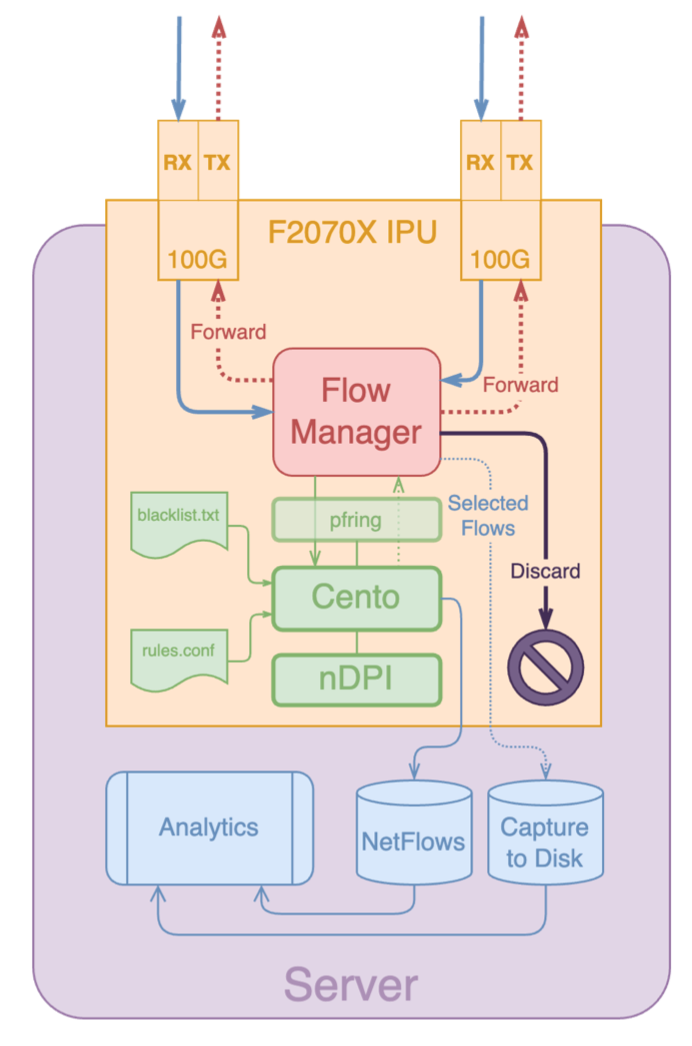
How this works:
- Running DPI on initial packets in software
- Offloading established flows into the adapter’s hardware flow tables
- Periodically retrieving flow counters with minimal CPU intervention
This hybrid approach lets Cento operate efficiently even under heavy traffic loads.
Get Started with Flow Offload
Below are practical examples showing how to configure and run Cento with flow offload support on top of Napatech adapters.
Configure the Adapter (NTPL Script)
First of all please follow the instructions in the PF_RING documentation for installing the Napatech SDK.
Then, before launching Cento, the Napatech adapter must be configured with an NTPL script to enable flow offload. Here’s a simple baseline flow-offload.ntpl that prepares one stream, assume both interfaces on the adapter are used.
Delete = All

// Pair of uplink and downlink ports
Define UL_PORT = Macro("0")
Define DL_PORT = Macro("1")
Define NUMA    = Macro("0")

// Streams (i.e. processing threads/cores)
Define STREAMS = Macro("(0..0)")

// Other internal macros
Define TX_FORWARD = Macro("0x00")
Define TX_DISCARD = Macro("0x08")

Define FLM_HIT       = Macro("0x00")
Define FLM_MISS      = Macro("0x10")
Define FLM_UNHANDLED = Macro("0x20")

Define FLM_DISCARD = Macro("3")
Define FLM_FORWARD = Macro("4")

Define isIPv4    = Macro("Layer3Protocol==IPv4")
Define isTcpUdp  = Macro("Layer4Protocol==TCP,UDP")
KeyType[Name=KT_4Tuple] = {32, 32, 16, 16}

Define KeyDefProtoSpec = Macro("(Layer3Header[12]/32, Layer3Header[16]/32, Layer4Header[0]/16, Layer4Header[2]/16)")
KeyDef[Name=KD_4Tuple; KeyType=KT_4Tuple; IpProtocolField=Outer; KeySort=Sorted] = KeyDefProtoSpec

// Load-balancing
HashMode = Hash5TupleSorted

// Streams setup
Setup[NUMANode=NUMA] = StreamId == STREAMS

// Map packets to host for new and unhandled flows
Assign[StreamId=STREAMS; ColorMask=FLM_UNHANDLED; Descriptor=DYN1] = Port==UL_PORT,DL_PORT AND isIPv4 AND isTcpUdp AND Key(KD_4Tuple, KeyID=1) == UNHANDLED
Assign[StreamId=STREAMS; ColorMask=FLM_MISS; Descriptor=DYN1] = Port==UL_PORT,DL_PORT AND isIPv4 AND isTcpUdp AND Key(KD_4Tuple, KeyID=1) == MISS
Then load this script on the adapter:
sudo /opt/napatech3/bin/ntpl -f flow-offload.ntplThis configures the hardware to start tracking flows and send the appropriate packets to the host for further inspection or offload.
Run Cento with Flow Offload
Once the adapter is configured, launch Cento:
cento -i nt:stream0 --flow-offload --dpi-level 2This tells Cento to use the Napatech stream with flow offload and DPI enabled.
Note: additional parameters for exporting flows needs to be configured according to the preferred export format.
Example of export to ntopng:
cento -i nt:stream0 --flow-offload --dpi-level 2 --zmq tcp://127.0.0.1:5556ntopng configuration:
ntopng -i tcp://*:5556cScale with Multiple Streams
To scale performance on high-speed links, configure multiple streams in the NTPL script.
For example, to set 4 streams:
Define STREAMS = Macro("(0..3)")Reload the script:
sudo /opt/napatech3/bin/ntpl -f flow-offload.ntplThen start Cento on all streams:
cento -i nt:stream[0-3] --flow-offload --dpi-level 2 \
  --processing-cores 0,1,2,3 --exporting-cores 4,5,6,7 \
  --max-hash-size 4000000
This spreads work across CPU cores and enlarges the flow cache to handle many concurrent flows.
Data can still be exported to ntopng through a single ZMQ endpoint as in the previous section, or through multiple endpoints (one per interface) for parallel export and optimal performance. Example:
cento -i nt:stream[0-3] --flow-offload --dpi-level 2 \
  --processing-cores 0,1,2,3 --exporting-cores 4,5,6,7 \
  --max-hash-size 4000000 \
  --zmq tcp://127.0.0.1:5556 \
  --zmq tcp://127.0.0.1:5557 \
  --zmq tcp://127.0.0.1:5558 \
  --zmq tcp://127.0.0.1:5559 \
  --zmq-direct-mapping
On the other side ntopng can be configured with multiple ZMQ endpoints, and a view interface aggregating all traffic into a single logical view:
ntopng -i tcp://*:5556c -i tcp://*:5557c -i tcp://*:5558c -i tcp://*:5559c -i view:allFlow Offload in Inline/Bridge Mode
Cento can also be deployed in inline bridge mode using cento-bridge, while still taking advantage of flow offload to combinine packet forwarding with hardware acceleration.
Here’s a simple baseline NTPL example optimized for bidirectional forwarding between two ports:
Delete = All

// Pair of uplink and downlink ports
Define UL_PORT = Macro("0")
Define DL_PORT = Macro("1")
Define NUMA    = Macro("0")

// Streams (i.e. processing threads/cores)
Define STREAMS = Macro("(0..3)")

Define TX_FORWARD = Macro("0x00")
Define TX_DISCARD = Macro("0x08")
Assign[ColorMask=DL_PORT; Descriptor=DYN1] = Port==UL_PORT
Assign[ColorMask=UL_PORT; Descriptor=DYN1] = Port==DL_PORT

// Forward all packets by default
Assign[ColorMask=TX_FORWARD; Descriptor=DYN1] = Port==UL_PORT,DL_PORT

// Flow Manager assignments (similar to capture config)
Assign[StreamId=STREAMS; ColorMask=FLM_UNHANDLED; Descriptor=DYN1] = Port==UL_PORT,DL_PORT AND isIPv4 AND isTcpUdp AND Key(KD_4Tuple, KeyID=1) == UNHANDLED
Assign[StreamId=STREAMS; ColorMask=FLM_MISS;      Descriptor=DYN1] = Port==UL_PORT,DL_PORT AND isIPv4 AND isTcpUdp AND Key(KD_4Tuple, KeyID=1) == MISS
Load it as before:
sudo /opt/napatech3/bin/ntpl -f flow-offload.ntplAnd start Cento in bridge mode with both TX and flow offload enabled:
cento-bridge -i nt:stream[0-3],nt:stream[0-3] \
  --tx-offload --flow-offload --dpi-level 2 --bridge-conf rules.conf
Here, rules.conf may contain traffic policing rules (e.g., forwarding or discarding specific protocols). Please take a look at the Cento documentation for more details. This is an example:
[bridge]
default = forward

[bridge.protocol]
NetFlix = discard
YouTube = discard
Performance
The Flow Manager is able to offload ~1.5 Million new flows/sec with one stream, 3+ Million new flows/sec with multiple streams, with a cache capacity of 140 Million active flows.
To give you an idea, assuming a 100 Gbit/s link with 1 Million concurrent flows of mixed Internet traffic, CPU load consumed by Cento usually stays in the 50-80% range, per core, on a 16-core CPU. By leveraging on flow offload support, it goes down to 10-20% (this may change a bit depending on CPU specs). PCI and memory bandwidth is also affected, as this dramatically reduces the amount of data transferred to the CPU, saving resources for processing more traffic on the same machine.
For full configuration reference and advanced options, see the official NetFlow Flow Offload and Bridge/Inline Offload guides.
Enjoy!